Claude Code Auto Mode Explained: Permissions Without the Prompts
TL;DR
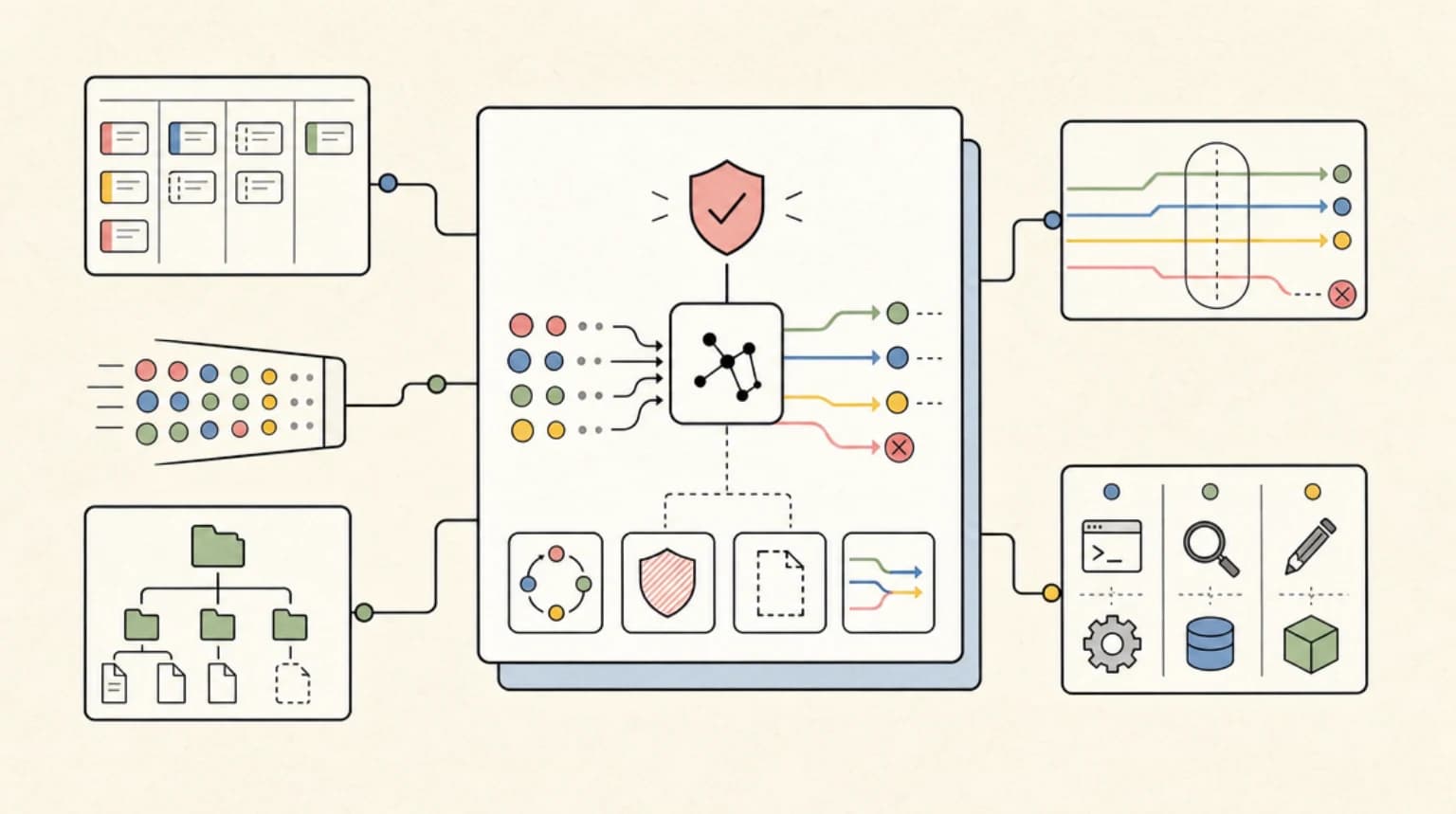
Auto mode replaces permission prompts with a background safety classifier - here is how the Shift+Tab cycle, hard_deny rules, and glob deny patterns actually fit together.
Official Sources#
| Source | Link |
|---|---|
| Claude Code Permission Modes | code.claude.com/docs/en/permission-modes |
| Claude Code What's New (Week 21) | code.claude.com/docs/en/whats-new/2026-w21 |
| Claude Code Changelog | github.com/anthropics/claude-code/blob/main/CHANGELOG.md |
| Claude Code Settings Reference | code.claude.com/docs/en/settings |
| Claude Code Security Model | code.claude.com/docs/en/security |
Last updated: June 20, 2026
Permission prompts are the tax you pay for letting an agent touch your filesystem. Claude Code's auto mode is Anthropic's bet that a second model can pay that tax for you: a safety classifier reviews every action in the background and only blocks the ones that look irreversible, destructive, or aimed outside your environment.
Auto mode has been quietly expanding for months. It reached the Pro plan in Week 21 (v2.1.143 to v2.1.149, May 18 to 22) after an early flag-gated period and a Max-first rollout, and it now works with Sonnet 4.6 alongside Opus. Along the way it picked up a real configuration surface: hard_deny rules nothing can override, prose-based environment trust lists, and glob deny patterns that fire before the classifier ever runs. Here is how it all fits together, verified against the current docs and changelog.
What Auto Mode Actually Is#
The permission modes reference describes six modes. In default mode only reads run without asking. In acceptEdits, file edits and common filesystem commands are auto-approved. For auto, the docs' summary is blunt: "Everything, with background safety checks." The recommended use case is long tasks and reducing prompt fatigue.
The mechanism: auto mode routes tool calls through a classifier model that blocks anything that escalates beyond your request, targets unrecognized infrastructure, or appears driven by hostile content Claude read. That last clause is the prompt-injection defense - if a fetched page tells Claude to exfiltrate your .env, the classifier should notice the action matches nothing you asked for.
Three things auto mode is not:
- Not bypassPermissions. Bypass skips checks entirely; the docs say to use it only in isolated containers and VMs. Auto mode keeps a gate, just moved from your keyboard to a model.
- Not a permissions replacement. Deny rules and explicit
askrules are evaluated before the classifier and still block or prompt in every mode. - Not GA. The docs label it a research preview that "reduces prompts but does not guarantee safety." Use it for tasks where you trust the general direction.
Auto mode also nudges Claude to keep working instead of stopping for clarifying questions, which is exactly what you want for the long unattended sessions covered in running Claude Code autonomously for hours.
Who Gets It: Plans, Models, Providers#
As of June 11, 2026, the current requirements are:
- Plan: all plans. The changelog shows the rollout order: Max subscribers got it in v2.1.111, the Pro plan followed in Week 21. On Team and Enterprise, an admin must enable it first, and admins can lock it off with
permissions.disableAutoMode: "disable"in managed settings. - Model: on the Anthropic API, Claude Opus 4.6 or later, or Sonnet 4.6. Older models, including Sonnet 4.5 and Haiku, are not supported on any provider.
- Provider: on by default on the Anthropic API. On Amazon Bedrock, Google Cloud Vertex AI, and Microsoft Foundry, auto mode shipped in v2.1.158 for Opus 4.7 and 4.8 only, and stays hidden until you set
CLAUDE_CODE_ENABLE_AUTO_MODE=1. - Version: Claude Code v2.1.83 or later.
If Claude Code reports auto mode as unavailable, one of those requirements is unmet; the docs are explicit that this is not a transient outage.
Shift+Tab: How the Mode Cycle Works#
In the CLI, Shift+Tab cycles default to acceptEdits to plan. Auto mode is not in that base cycle. Per the permission modes docs, it appears once your account meets the requirements, and cycling to it shows an opt-in prompt until you accept it. Selecting "No, don't ask again" removes auto from the cycle entirely.
The ordering is specific: enabled optional modes slot in after plan, with bypassPermissions first and auto last. So if you started with --allow-dangerously-skip-permissions, you cycle through bypass on the way to auto. dontAsk never appears in the cycle; it is flag-only.
Two details worth knowing:
- Agent sessions cycle too. Since v2.1.143, Shift+Tab inside attached
claude agentssessions includes auto mode, so background workers can be flipped into auto without restarting. - A repo cannot grant itself auto mode. Since v2.1.142, Claude Code ignores
defaultMode: "auto"in.claude/settings.jsonand.claude/settings.local.json. To start in auto by default, the setting must live in user-level~/.claude/settings.jsonor managed settings:
JSON
{
  "permissions": {
    "defaultMode": "auto"
  }
}
This is the same trust-boundary thinking that runs through the whole feature: project files are attacker-influenced input, so they do not get to loosen your permissions.
From the archive
Claude Code Fast Mode: When 2.5x Speed Is Worth 2x Price
Jun 11, 2026 • 8 min read
Claude Code Routines vs Managed Agents Schedules: Where Recurring Agent Work Should Live
Jun 11, 2026 • 9 min read
Subagents vs Agent Teams vs Workflows: Claude Code's Parallelism Primitives, Compared
Jun 11, 2026 • 9 min read
Claude Fable 5 vs Gemini 3.1 Pro: The July 2026 Frontier Comparison
Jun 11, 2026 • 10 min read
The Four-Tier Rule Stack: hard_deny, soft_deny, allow, intent#
The classifier is configurable through the autoMode settings block, documented on the configure auto mode page. The headline addition is hard_deny, which landed in v2.1.136: rules that block unconditionally, regardless of user intent or allow exceptions. Precedence works in four tiers:
hard_denyblocks unconditionally. Nothing overrides it.soft_denyblocks next, but user intent and allow exceptions can clear it.allowrules override matching soft_deny rules as exceptions.- Explicit user intent overrides remaining soft blocks - but only when your message directly describes the exact action. The docs draw the line cleanly: asking Claude to "clean up the repo" does not authorize a force-push, but asking it to "force-push this branch" does.
The surprising part: these are prose, not patterns. You write them the way you would describe your infrastructure to a new engineer:
JSON
{
  "autoMode": {
    "environment": [
      "$defaults",
      "Source control: github.example.com/acme-corp and all repos under it"
    ],
    "soft_deny": [
      "$defaults",
      "Never run database migrations outside the migrations CLI, even against dev databases"
    ],
    "hard_deny": [
      "$defaults",
      "Never send repository contents to third-party code-review APIs"
    ]
  }
}
The "$defaults" literal matters more than it looks. Each array replaces the built-in list unless you include it: a soft_deny array without "$defaults" discards every built-in soft block, including the force-push and curl | bash rules, and a hard_deny array without it discards the built-in data exfiltration and auto-mode bypass rules. Support for "$defaults" landed in v2.1.118 precisely so you can extend rather than replace.
autoMode.environment is the field to touch first. Out of the box the classifier trusts only the working directory and the repo's configured remotes, so pushing to your own GitHub org gets blocked until you list it. Three CLI subcommands keep you honest: claude auto-mode defaults prints the built-in rules, claude auto-mode config prints the effective merged config, and claude auto-mode critique has a model review your custom rules for ambiguity and likely false positives.
One scope rule to internalize: the classifier reads autoMode from user, local, and managed settings, but never from the shared .claude/settings.json checked into a repo. Same reasoning as the defaultMode restriction above.
Glob Deny Patterns: The Layer Before the Classifier#
The classifier is the second gate. The first gate is the regular permissions system, which got its own upgrade in this window: v2.1.166 added glob pattern support in the deny rule tool-name position, so "*" now denies all tools, and unknown tool names in deny rules warn at startup instead of silently matching nothing.
This is where hard guarantees live. The auto mode docs say it plainly: for actions that must never run regardless of user intent or classifier configuration, use permissions.deny in managed settings, which blocks before the classifier is consulted and cannot be overridden. Prose hard_deny rules depend on a model interpreting them; permissions.deny rules are deterministic pattern matches.
The patterns themselves support wildcards at any position in Bash specifiers:
JSON
{
  "permissions": {
    "allow": [
      "Bash(npm run *)",
      "Bash(git commit *)"
    ],
    "deny": [
      "Bash(git push *)",
      "Read(./.env)",
      "WebFetch(domain:pastebin.com)"
    ]
  }
}
Two gotchas from the docs. First, Bash(*) is equivalent to bare Bash, and as a deny rule both forms remove the tool from Claude's context entirely rather than just blocking calls. Second, the space before * matters: Bash(ls *) matches ls -la but not lsof. If you audit agent activity the way we covered in permissions, logs, and rollback for AI coding agents, these deny rules are the enforcement half of that story.
Reviewing Denials and Wiring Up Hooks#
Denials are not dead ends. Since v2.1.89, denied commands show a notification and land in /permissions under the Recently denied tab, where pressing r marks an action for retry and resumes the conversation. Repeated denials for the same destination usually mean the classifier lacks context; the fix is adding that destination to autoMode.environment, then confirming with claude auto-mode config.
For programmatic reactions there is a dedicated PermissionDenied hook that fires after classifier denials; returning {"retry": true} tells the model it can try again. That slots into the event system covered in Claude Code hooks explained, and it pairs well with the orchestration patterns in the dynamic workflows guide, where long multi-agent runs are exactly the sessions you do not want stalling on a prompt at 2 a.m.
The honest assessment: auto mode is the most usable middle ground Claude Code has shipped between prompt-per-action and full bypass. The classifier adds latency and sometimes blocks things it should not, which is why the denial-review loop exists. But the layering is sound - deterministic deny globs first, prose classifier rules second, hard_deny for the lines you never want crossed.
FAQ#
Is Claude Code auto mode available on the Pro plan?#
Yes. Auto mode reached the Pro plan in Week 21 of 2026 (v2.1.143 to v2.1.149), and the requirements page now lists all plans. On Team and Enterprise an admin must enable it first. You also need v2.1.83 or later and a supported model.
How do I turn on auto mode in Claude Code?#
Update Claude Code, then press Shift+Tab to cycle permission modes. Auto mode appears after plan mode once your account meets the requirements, with a one-time opt-in prompt. To start in auto by default, set permissions.defaultMode to "auto" in ~/.claude/settings.json - project-level settings files are ignored for this value.
What is the difference between hard_deny and permissions.deny?#
autoMode.hard_deny rules are prose instructions the safety classifier enforces inside auto mode, blocking unconditionally with no allow or intent override. permissions.deny rules are deterministic tool patterns (including globs like Bash(git push *)) evaluated before the classifier, in every mode. For guarantees, use permissions.deny in managed settings; for judgment calls, use hard_deny.
Does auto mode work on Bedrock, Vertex AI, or Foundry?#
Yes, since v2.1.158, but only with Claude Opus 4.7 and Opus 4.8, and it stays off until you set CLAUDE_CODE_ENABLE_AUTO_MODE=1 in your environment or settings env block. On the Anthropic API it is available by default.
Is auto mode safe enough to replace reviewing changes?#
No, and Anthropic does not claim it is. The docs call it a research preview that "reduces prompts but does not guarantee safety." The right mental model is trusting the direction of a task, not skipping review of sensitive operations.
Sources#
All sources fetched and verified June 11, 2026.
- Permission modes - Claude Code docs - mode table, Shift+Tab cycle order, auto mode requirements, defaultMode restrictions
- Configure auto mode - Claude Code docs - four-tier precedence, hard_deny/soft_deny/allow, environment, "$defaults", CLI subcommands, denial review
- Permissions - Claude Code docs - rule syntax, wildcard patterns, deny rule behavior, disableAutoMode
- What's New Week 21 - Claude Code docs - auto mode on the Pro plan with Sonnet 4.6
- What's New Week 19 - Claude Code docs - settings.autoMode.hard_deny introduction
- Claude Code CHANGELOG - version pins: v2.1.89, v2.1.111, v2.1.118, v2.1.136, v2.1.142, v2.1.143, v2.1.158, v2.1.166
Read next
Ultracode: Claude Code Multi-Agent Orchestration Mode Explained
Ultracode is two documented things: a prompt keyword that turns one task into a dynamic workflow, and an /effort setting that pairs xhigh reasoning with automatic orchestration. Here is exactly what the docs say.
8 min readClaude Code Cross-Session Messaging: Your Agents Can Now Talk to Each Other
Claude Code v2.1.224 lets one running session message another over a first-party channel - plain text, permission-aware, with approval dialogs when bypass-mode sessions talk to each other. Here is what ships, how delivery and inbound controls work, and where the feature stops.
7 min readClaude Code Dynamic Workflows: The Complete Guide
Claude Code dynamic workflows turn orchestration into a JavaScript script that runs up to 1,000 agents per run - here is how scripts, schemas, budgets, and resume actually work.
10 min readShare
Developers Digest
Technical content at the intersection of AI and development. Building with AI agents, Claude Code, and modern dev tools - then showing you exactly how it works.
300+ videos30K+ GitHub stars850+ articles
Related Tools
AI CodingDaily Driver

Claude Code
Anthropic's agentic coding CLI. Runs in your terminal, edits files autonomously, spawns sub-agents, and maintains memory...
View ToolAI Models

Claude Opus 4.7
Anthropic's flagship reasoning model. Best-in-class for coding, long-context analysis, and agentic workflows. 1M token c...
View ToolProductivityNew
A
AgentCanvas
A hosted infinite canvas your headless AI agents drive over MCP. Any MCP-speaking agent - Claude Code, Codex, Cursor, or...
View ToolAI CodingEssential

Cursor
AI-native code editor forked from VS Code. Composer mode rewrites multiple files at once. Tab autocomplete predicts your...
View ToolApps from Developers Digest
Developer ToolsIn Progress
Skill Builder
Turn a one-liner into a working Claude Code skill. From idea to installed in a minute.
View AppDeveloper Tools
Agent Hub
Every coding agent in one window. Stop alt-tabbing between Claude, Codex, and Cursor.
View AppDeveloper ToolsPlus $20/mo
Skills Pro
Unlock pro skills and share private collections with your team.
View AppRelated Guides
Guide
Auto Mode - Claude Code
Eliminate prompts with a background classifier that judges safety.
Claude CodeGuide
Bash Mode - Claude Code
Prefix prompts with ! to run shell commands directly, bypassing Claude.
Claude CodeGuide
Accept Edits Mode - Claude Code
Auto-approve file edits and common filesystem commands.
Claude CodeRelated Videos

Claude Code: NEW Remote Control, Auto Memory, Plugins & More
Anthropic's Big Claude Code & Cowork Update: Remote Control, Scheduled Tasks, Plugins, Auto Memory + New Simplify/Batch Skills The script recaps a consolidated update on new Anthropic releases across
Video·
Claude Code 'Interview' Mode in 6 Minutes
Effortless Project Planning: Mastering Spec-Driven Development with Claude Code Kick off the new year with a fresh approach to project planning using Claude Code! In this video, learn how to achieve
Video·

Claude Code Can Now Automate Work in Chrome
In this video, learn to utilize Claude Code within Chrome to access new automation capabilities that were previously impossible. Leveraging your existing browser sessions, Claude Code enhances...
Video·
Related Posts
8 min read
Rime
Make Your Coding Agents Talk: Voice Summaries with the Rime CLI
The Rime CLI streams natural-sounding text-to-speech straight from your terminal, so Claude Code, Codex, Devin, and Open...
7 min read
News
Claude Code Cross-Session Messaging: Your Agents Can Now Talk to Each Other
Claude Code v2.1.224 lets one running session message another over a first-party channel - plain text, permission-aware,...

8 min read
AI Agents
Agent Workspaces Need Filesystem Contracts
GitHub's latest agent workspace trend points at a boring but important primitive: agents need explicit filesystem contra...
8 min read
Claude Code
Claude Agents vs Skills: Which One Do You Actually Need?
Claude agents vs skills, untangled: agents are workers with their own context window, skills are instructions loaded on...
10 min read
Claude Code
Claude Code Dynamic Workflows: The Complete Guide
Claude Code dynamic workflows turn orchestration into a JavaScript script that runs up to 1,000 agents per run - here is...
10 min read
Claude Code
Managing a Fleet of Claude Agents: A Practical Guide
An ops guide to managing a fleet of Claude agents: spawning patterns, worktree isolation, build gates, orphaned-agent fa...
Build with the member tools
Get Smarter About AI Dev
New tutorials, open-source projects, and deep dives on coding agents - delivered weekly.
One email per weekReal code, not theoryFree forever